
Download CGDream – AI Image Generation Tool for Creators
Introduction
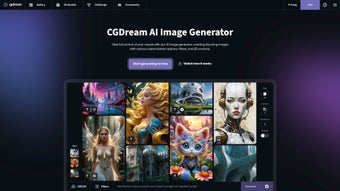
CGDream is a cutting‑edge, web‑based AI image generation platform designed for creators who demand fast, reliable visual content without the hassle of installing heavyweight software. By simply typing a natural‑language description, users can conjure unique, high‑resolution images that are ready for art projects, social‑media posts, advertising campaigns, or any other visual medium. The tool distinguishes itself by supporting both positive and negative prompting, giving creators the power to emphasize desired elements or explicitly suppress unwanted details.
Whether you need a dreamy landscape, a futuristic product mock‑up, or a stylized portrait, CGDream offers a range of AI models trained on diverse datasets, letting you control style, mood, and fidelity. You can fine‑tune image dimensions, the number of variations, and granular parameters such as chaos, creativity, and quality. All generated assets are stored privately by default, ensuring that your ideas stay confidential until you decide to share them.
CGDream’s intuitive interface, robust feature set, and secure cloud‑based processing make it an indispensable tool for designers, marketers, and hobbyists alike who want to translate imagination into visual reality with a single click. The platform also provides a free tier for occasional users and scalable paid plans for power users, ensuring that budget constraints never block creative flow. In the following sections we’ll explore the key capabilities, walk through the step‑by‑step usage process, and provide a balanced look at the strengths and limitations of the service.
Key Features that Power Your Creativity
CGDream’s feature set is built around flexibility and ease of use, allowing both beginners and seasoned artists to generate stunning visuals quickly. The platform’s architecture combines multiple AI models, each optimized for a particular artistic style, with an extensive prompting system that lets you shape the output precisely. Below is a detailed list of the most important capabilities, followed by a short explanation of how each feature can enhance your workflow.
- Text‑to‑Image Generation: Input natural‑language prompts and receive instantly rendered images, reducing the time from concept to final asset.
- Positive & Negative Prompts: Emphasize desired elements or explicitly exclude unwanted details, giving you granular control over composition.
- Multiple AI Models: Choose from a curated library of models (photorealistic, illustration, abstract, anime, etc.) each trained on distinct datasets.
- Custom Dimensions & Batch Count: Set exact width × height values and generate several variations in a single request, perfect for A/B testing.
- Quality, Chaos & Creativity Sliders: Adjust technical parameters to balance realism, randomness, and artistic flair, enabling both precise and experimental outputs.
- Suggested Filters & Post‑Processing: Apply AI‑driven filters for color grading, sharpening, or stylistic effects directly in the web UI, eliminating the need for external editors.
- Private Storage & Secure Sharing: All images are kept private on the cloud; you decide when and how to share them with teammates or clients.
- Cross‑Platform Accessibility: Works in any modern browser on Windows, macOS, Linux, iOS, and Android devices, ensuring you can create from desktop or mobile.
- Regular Model Updates: New styles and performance improvements are rolled out automatically, keeping the tool fresh and competitive.
- Export Options: Download images in PNG, JPEG, or WebP formats with customizable compression levels to suit web or print requirements.
- API Access: A RESTful API lets developers integrate CGDream into custom pipelines, content‑management systems, or batch‑processing scripts.
- Usage Credits System: A transparent credit system tracks consumption, making it easy to monitor costs and plan upgrades.
By combining these capabilities, CGDream serves as a one‑stop solution for rapid visual creation, whether you’re drafting a concept board, generating marketing assets, or exploring new artistic directions. The platform’s emphasis on security, flexibility, and continuous improvement ensures that it remains relevant as AI technology evolves.
Installation, Usage Guide & Compatibility
Because CGDream is entirely cloud‑based, there is no traditional installation process. Simply navigate to cgdream.com using any up‑to‑date web browser (Chrome, Edge, Firefox, Safari) and sign up for a free account. After email verification, you’ll land on the main dashboard where the prompt box and control panels await.
Step‑by‑step usage:
- Enter a descriptive prompt in the text field. For example, “A cyberpunk cityscape at dusk, neon lights reflecting on wet streets, with a lone figure holding a glowing umbrella.”
- Optionally add negative prompts in the adjacent box, such as “no people, no cars,” to remove unwanted subjects and keep the focus on architecture.
- Select an AI model from the dropdown menu that matches your desired style (e.g., “Photorealistic” for lifelike renderings or “Illustration” for hand‑drawn looks).
- Adjust image dimensions, the number of outputs, and sliders for quality, chaos, and creativity. The sliders provide real‑time visual feedback on how each parameter influences the result.
- Click “Generate.” CGDream processes the request on its secure servers and returns a gallery of images within seconds to a few minutes, depending on the complexity and current load.
- Review the results, apply suggested filters if desired, and click “Download” to save the file(s) to your device. You can also add the images to a private collection for later retrieval.
Compatibility: Since the service runs in the browser, it supports all major operating systems—Windows 10/11, macOS 12+, Linux distributions, iOS 13+, and Android 9+. The only requirement is a stable internet connection and a browser that supports WebGL and modern JavaScript standards.
For power users, CGDream offers an API key that can be integrated into design pipelines, scripting tools, or content‑management systems, extending its capabilities beyond the UI. Documentation for the API is available under the “Developers” section of the website and includes examples in Python, JavaScript, and curl commands.
If you encounter any issues during the onboarding process, CGDream provides a comprehensive help center, live chat support, and community forums where users share prompt engineering tips and creative ideas. Regular webinars and tutorial videos also help newcomers master advanced features such as batch generation and custom model fine‑tuning.
Pros & Cons, FAQ & Final Thoughts
Pros
- Instant, high‑quality image generation without local hardware constraints.
- Flexible prompting system (positive + negative) for fine‑grained control.
- Wide selection of AI models catering to different artistic needs.
- Browser‑based access makes it platform‑agnostic and easy to start.
- Private storage by default ensures confidentiality of creative work.
- Regular updates and new model releases keep the tool future‑proof.
- Free tier available for occasional users; paid plans scale with usage.
- API access enables automation and integration with existing workflows.
- Transparent credit system helps manage costs and plan upgrades.
- Extensive documentation, tutorials, and community support.
Cons
- Dependent on internet connectivity; offline generation is not possible.
- High‑resolution outputs may consume more credits on the free tier.
- Advanced users may miss deeper customization options found in desktop‑only AI tools.
- Image ownership terms require users to review licensing for commercial use, especially on the free plan.
- Complex prompts sometimes produce unexpected results, requiring iteration.
- Processing time can increase during peak usage periods, affecting speed.
Is CGDream completely free to use?
CGDream offers a generous free tier that allows a limited number of image generations per month. For power users, premium plans provide higher credit limits, priority processing, and additional features such as bulk API access.
Can I use the generated images for commercial projects?
Yes, images produced under a paid subscription are granted commercial usage rights. Free‑tier users should review the licensing agreement, as some restrictions may apply to resale or redistribution.
What file formats does CGDream support for download?
You can download images in PNG, JPEG, or WebP formats. The platform also lets you adjust compression levels to balance quality and file size.
How does the negative prompting feature work?
Negative prompts allow you to specify elements you do not want in the final image. For instance, adding “no text” or “no watermarks” will instruct the AI to avoid those features, increasing the relevance of the output.
Is there an API for integrating CGDream into my own apps?
Yes, CGDream provides a RESTful API with comprehensive documentation. After generating an API key from your account dashboard, you can send prompt payloads programmatically and receive image URLs in response.
In summary, CGDream delivers a powerful, user‑friendly solution for anyone who needs high‑quality AI‑generated visuals on demand. Its blend of intuitive controls, diverse model library, and secure cloud processing makes it a standout choice in a crowded market. Whether you’re a freelance designer, a social‑media manager, or a brand marketer, CGDream can streamline your visual workflow and free up creative bandwidth.
Ready to turn your ideas into stunning images? Sign up for a free account today and start generating instantly. Experience the convenience of browser‑based AI art, enjoy the flexibility of positive and negative prompting, and benefit from a platform that grows with your creative ambitions.



.png)



